

Self-hosted · pfSense fleet management
Manage every firewall without opening a port.
A lightweight agent on each pfSense box dials out to your server over NATS. You get one console for the whole fleet.
The console, annotated
fig. 2 — device detail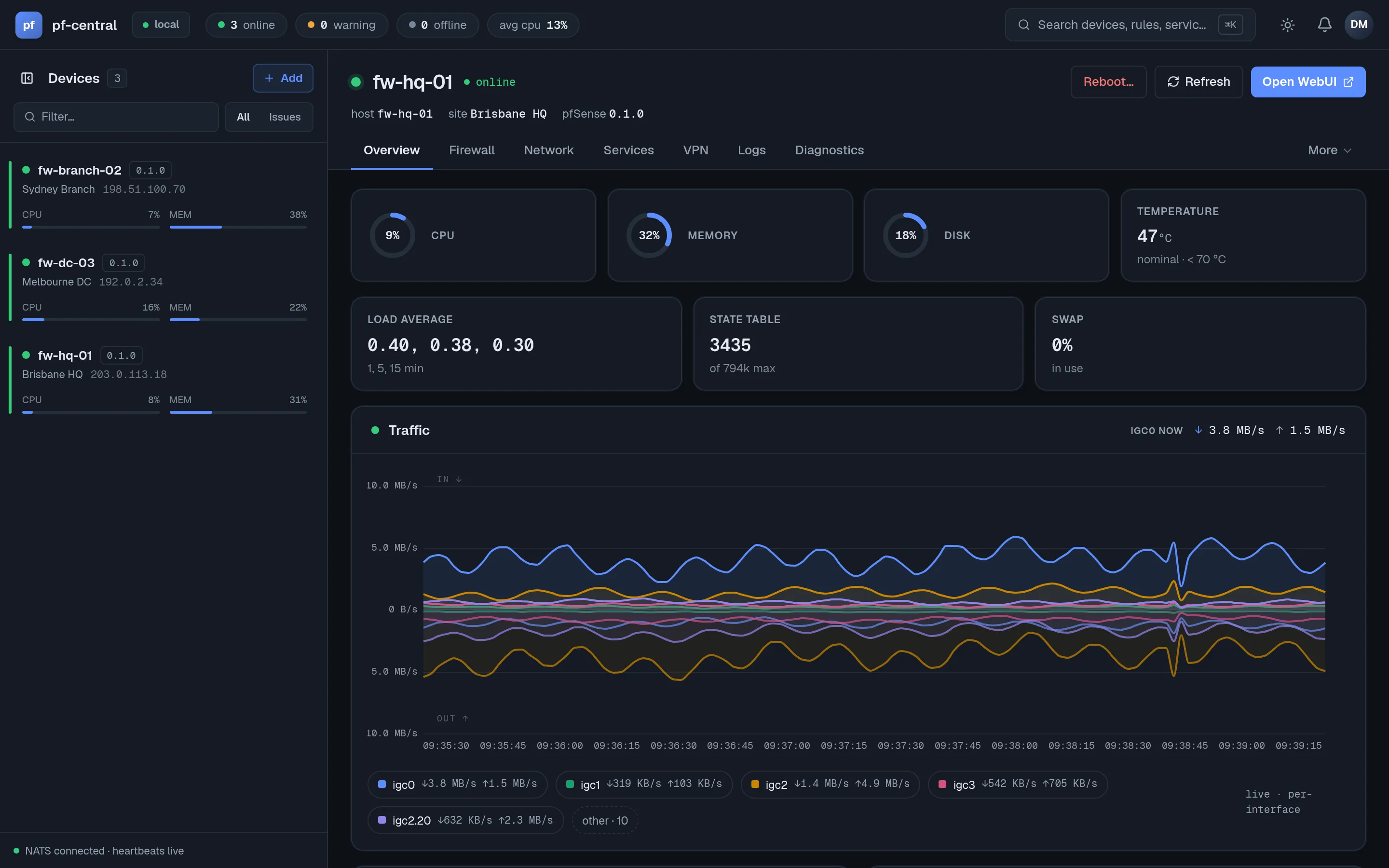
-
Fleet rail. Every firewall with its online state and live CPU and memory.
-
Live vitals. CPU, memory, disk and temperature streamed from the agent.
-
Per-interface traffic. In and out, charted as it happens.
Specification
What you get
- No open ports
- Agents dial out to the server. Nothing new listens on the firewall, and sites behind NAT just work.
- Agent-based
- A FreeBSD agent exposes device operations as NATS micro services. The pfSense package sets it up from the GUI.
- Multi-user RBAC
- Owner, admin, operator and viewer roles, with an audit log.
- One connection
- Firewall rules, NAT, VPNs, DHCP, DNS, interfaces, routing, services and diagnostics.
Up and running in three steps
-
Deploy the server
One distroless container plus PostgreSQL. First boot generates all crypto material.
-
Install the agent
The pfSense package connects outbound and enrolls with a one-time bootstrap token.
-
Manage the fleet
Push rules, aliases and VPN tunnels with live status per device.
Ready to enroll your first firewall?
The quickstart takes about 15 minutes.